A small beauty salon should not need a £200-a-month commerce platform to take a booking. That sounds obvious when you say it out loud. It is less obvious when you look at what most booking tools actually cost once you factor in the monthly SaaS seat, the payment gateway markup, the email provider, and the hosting — and that is before a single customer has pressed confirm.
We just shipped Phase 1 of the CMH Beauty website — a booking flow that feels clean and deliberate, runs on entirely free-tier infrastructure, and costs Charlie May exactly nothing in monthly fees. Here is how we built it, and why we made the choices we did.
The brief
Charlie May is a one-person salon. She does brow laminations, lash lifts and tints, makeup, waxing, and a range of treatments — services priced between £8 and £50. Her clients are predominantly local, predominantly mobile-first, and predominantly booking a slot they saw while scrolling Instagram on their phone. The window between interest and decision is short.
The brief had three requirements that were non-negotiable:
- Zero friction from decision to booking. A customer who has to navigate multiple pages or re-enter their details twice will leave. At £25, the psychological cost of giving up is low. The booking flow has to earn every step.
- Instant payment. Apple Pay and Google Pay on mobile. Card as the fallback. No invoicing, no deposits-via-bank-transfer, no back-and-forth. A booking that is not paid is not a booking.
- Financially sane infrastructure. Charlie is building a business. Every pound of overhead is a pound that does not go back into it. The stack needed to cost nothing to run on a day-to-day basis.
The UX decision: one page, everything visible
The most important engineering decision on this project was not a technology choice. It was a layout choice.
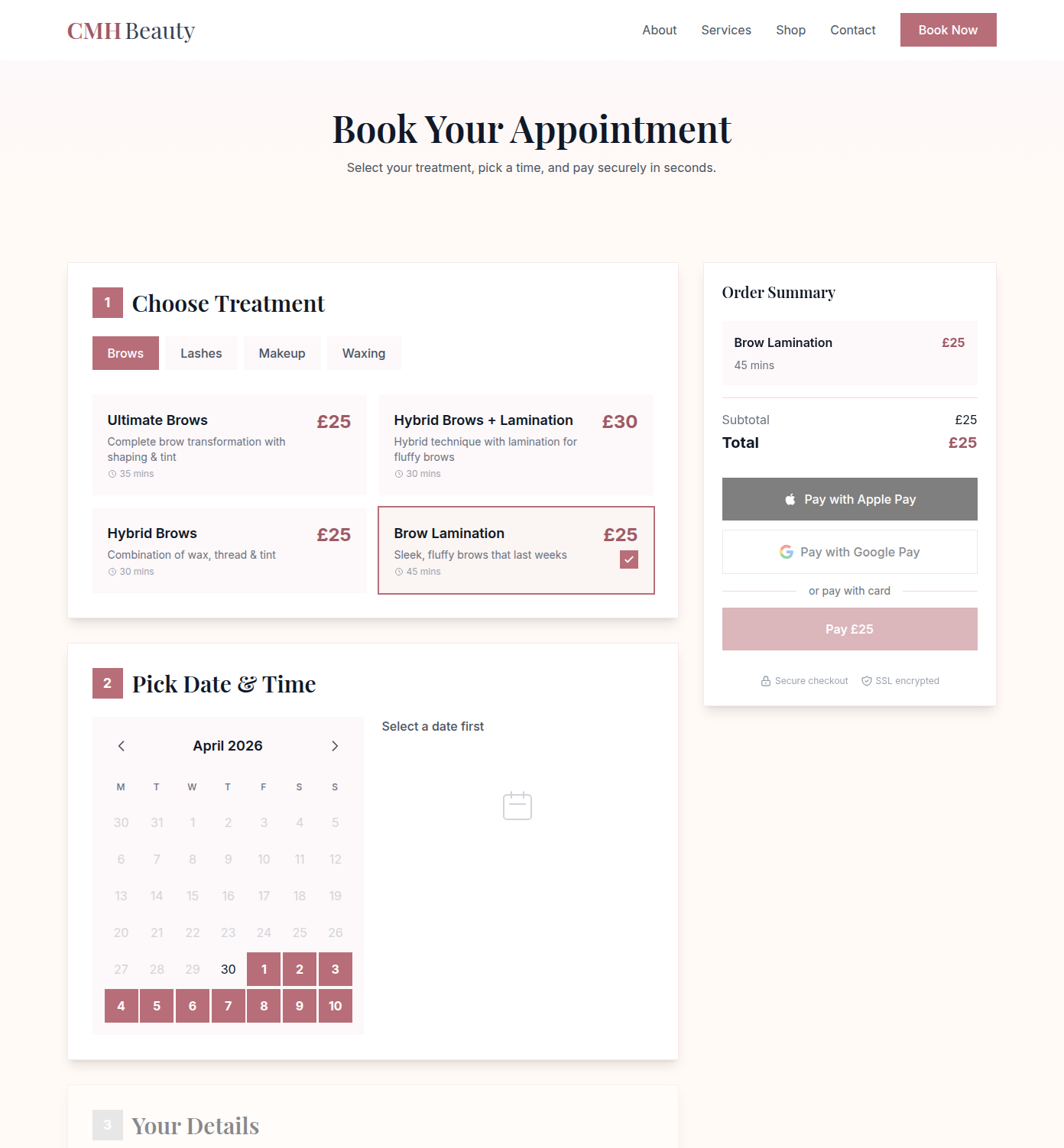
The booking flow has three steps — choose a treatment, pick a date and time, enter your details — but all three coexist on a single page. To the left, the steps progress as you fill them in. To the right, a sticky sidebar shows your order summary the entire time: treatment name, price, selected slot. Below that, the payment buttons — Apple Pay, Google Pay, card — are always visible. They are greyed out until the form is complete. You can see exactly where you are going before you commit.
That is a deliberate reference to how Apple handles a checkout. The order summary is not revealed at the end. The total is not a surprise. The payment button is not hidden three screens away. Everything is present and accounted for from the moment you land on the page.
This matters more for low-ticket services than for high-ticket ones. If you are buying a £500 piece of furniture, you will tolerate a multi-step funnel because the decision has gravity. If you are booking a £25 brow lamination, any friction — a page reload, a spinning loader, a step that feels unnecessary — gives the hesitant user a reason to close the tab. The single-page layout removes those reasons. There is nothing left to interrupt the decision.
Treatment selection is handled with a tabbed interface: Brows, Lashes, Makeup, Waxing. Switch tabs, the treatment list updates instantly. No page navigation. Alpine.js handles all of the state — which tab is active, which treatment is selected, which date has been chosen — and the UI reacts immediately. No React, no full framework overhead, no server round-trips for UI transitions.
Why we did not use Medusa, Magento, or Shopify for this
The honest answer is that we started with something heavier.
Early in the project, the booking layer was prototyped on Medusa — a headless commerce engine that QB Digital knows well and uses on larger builds. Medusa is a serious tool. It is also a server that needs hosting, a database it owns, and infrastructure that sits running whether or not it is doing anything. For a busy enterprise store, that overhead is worth it. For a single-operator beauty salon taking perhaps twenty bookings a week, we were overbuilding. The monthly Railway bill for the Medusa server alone was around £10. That might seem trivial, but it is an unnecessary cost that compounds across multiple small clients if you adopt it as a pattern.
We decommissioned the Medusa stack and rebuilt the booking layer directly on free-tier services that are each best-in-class at their specific job:
- Vercel — hosting and edge delivery for the static site. The free tier is generous, the deployment pipeline from a GitHub push is under a minute, and the global CDN means the site loads fast everywhere. Cost: £0/month.
- Supabase — PostgreSQL database for bookings, availability, and customer records. Supabase's free tier covers the data volume of a small service business with headroom to spare. No database server to manage, no connection pooling to configure. Cost: £0/month.
- Resend — transactional email for booking confirmations. Clean API, reliable delivery, and a free tier that covers thousands of emails per month. Cost: £0/month.
- Stripe Checkout — Apple Pay, Google Pay, and card processing via Stripe's hosted payment page. No monthly platform fee, no setup cost. Stripe takes a per-transaction percentage, which is exactly the right model for a small business: you only pay when Charlie earns. Cost: £0/month base, pay-per-transaction only.
The total fixed monthly infrastructure cost for this stack is £0. Charlie pays nothing until a customer pays her.
That is not a compromise position. Vercel, Supabase, Resend, and Stripe are not second-rate tools that happen to be free. They are the services that serious engineering teams use on significant projects. The free tiers exist because these companies are competing for the early adopters who will grow into paying customers. A small beauty salon with twenty bookings a week is the perfect fit for that tier and should be on it.
What is live today
cmhbeauty.co.uk is live. The full site shipped today: home, about, services, book, contact — all six pages, built in Tailwind CSS with Alpine.js, deployed on Vercel, loading fast on mobile.
The booking page is fully built and live. The one-page layout, the treatment tabs, the calendar, the sticky order summary — all of that is there and working as described above.
The payment buttons are the next phase. The UI for Apple Pay, Google Pay, and card is in place — the buttons render, the order summary is populated, the checkout experience is clear. The Supabase backend, the Stripe webhook integration, and the Resend confirmation emails are designed and will be wired in over the next few days. That work is in progress. We will not claim real payments are processing until they are.
This is a deliberate phased approach. Shipping the site and the booking UI now means Charlie has a professional presence online immediately. The payment infrastructure goes live as soon as it is tested end-to-end. There is no point rushing that part — payment flows require careful testing, and a failed Stripe webhook on a real customer booking is worse than a few more days on the free tier.
The same engine, a different coat of paint
One reason we invested in getting this architecture right is that it is not a one-off. The same booking engine is going to power Emily's Pet Services — a force-free dog trainer in Oswestry — as her booking flow matures. Different theme, different service categories, different pricing. Same Vercel deployment, same Supabase database pattern, same Stripe integration, same Resend email setup.
That portability is deliberate. Building a custom booking widget for every client from scratch is how you end up with six different incompatible systems that each need individual maintenance. Building one engine that can be themed and configured is how you serve a dog trainer and a beauty salon and a yoga studio from a single codebase with consistent reliability.
The constraints that make this a good system are the same constraints that make it reusable: no persistent server state (Supabase handles that), no proprietary deployment platform (any Vercel-compatible static site deployer will work), no per-seat licence fee that grows with the client count. The engine is lean because it has to be lean, and that leanness is the feature.
What is coming next
Two things are in progress and worth mentioning clearly.
First, the full booking backend goes live in the next phase — Supabase availability management, Stripe Checkout session creation, webhook handling to confirm the booking on payment, and Resend confirmation emails to both Charlie and the customer. That is a few days of focused backend work, and it is the piece that turns the booking UI into a working booking system.
Second, Charlie also wants to sell her own beauty products online — skincare, tools, the kind of retail line that a salon naturally builds around its services. That is a separate piece of work entirely. For a product catalogue with inventory, orders, and fulfilment, a Medusa-powered store is the right answer — and one is in development for exactly that purpose. It will not share infrastructure with the booking system; they are different problems. We mention it here because it is coming, and because it is a good illustration of picking the right tool for the shape of the job.
The broader principle
QB Digital does Magento for enterprise retailers with complex catalogues, multi-store setups, and ERP integrations. We also do this. The discipline is the same: understand the actual requirements before reaching for a technology, choose the tool that fits the problem rather than the tool that is most impressive, and make sure the infrastructure does not cost more than the business can justify.
A £200/month commerce platform for a sole-trader beauty salon is not aspirational. It is the wrong call. A booking system that costs nothing to run, deploys in seconds, and handles Apple Pay on mobile is the right one. The client's margins deserve as much engineering respect as the user's experience.
CMH Beauty is live at cmhbeauty.co.uk. Brows, lashes, makeup, waxing — book online.
Running a small service business and thinking about a booking system that does not eat into your margins? Get in touch.